Author Archives


22
Oct 10

Free PSD everyday

This came to me via a guy at my work. You can download the psd files and see how they were created. There are some nice looking files on here, tons of buttons, icons, web stuff and some nice examples of creating illustrations in photoshop. Dig in people.

365psd.com

26

204


6
Sep 10

Super Quick 2d Rendering Tutorial

I’ve been asked once or twice how I create some of my images. Here’s a quick rundown on how I did this illustration.

This tutorial is not aimed at making something look great but really to get the job done with a quick deadline. I’m not a great illustrator but I can get shit done fast and still make them look reasonably good. Sometimes that’s all the job requires.

m3a

It’s not overly detailed or even that good but it only took an hour and it’s going to be pretty small in the final image.

MidPowerM3Boot

So here we go!

Continue reading →


3
Sep 10

Things you wish you would have learned long ago

I’ve been using illustrator now since oh version 1.4 or something and I think it’s crazy how I’m still always learning on it. For example, for some silly ass reason I never bothered to really get used to setting up symbol libraries and custom user profiles. Finally after all this time I set up a user profile with custom swatches and symbols that I use every time I start up a new document. What a time saver.

symbols

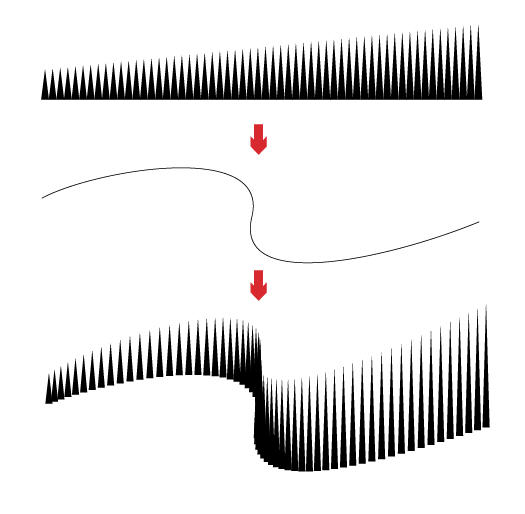
And then I find this gem in Computer Arts latest edition. Here’s a tip from Luke O’Neil on blending paths. Now I’ve used blending paths quite a bit but I had no idea you could shape them to a custom spline.

tip

05___ Creating blends between two objects is easy in illustrator. You draw 2 objects and go to Object>Blend>Make or, alternatively, specify the number of steps you’d like in the options box. It’s also possible to change the direction of the blend by simply drawing a path and, with the blend and path selected, going to Object>Blend>Replace Spine.

How about you, anything you recently discovered that you are kicking yourself in the ass for not using earlier?


6
Jul 10

Illustration Challenge

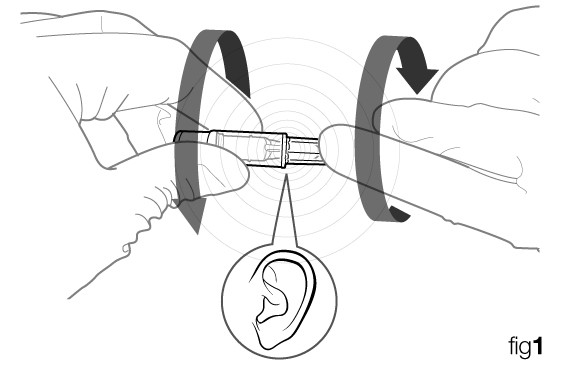
Most of the stuff I do involves having to make illustrations for instructions that speak clearly and can have no text at all. The obvious reason for this are so that there will be no need for translations into multiple languages. One thing I come across all the time is the need for an icon or symbol that describes something making a sound or a click. I’ve tried a variety of things from an ear to a speaker to some silly lines indicating a noise. I would rather not go so far as to add music notes. What do you think would be a good icon or symbol to use? Draw one up if you would like, it might be fun.

TwoFer_fig1


3
Jul 10

Critique Request!

Steven Howards writes in….

This is my portfolio link, http://www.swhowardillustration.blogspot.com

I’ve been studying illustration at the Academy of Art University in San Francisco and have only recently developed a desire to pursue technical illustration. I know there is much that I need to do and work on, but any comments, critiques, and help is very much appreciated!

Here’s my critique, you do very nice work, keep drawing your butt off. If a chump like me can make it as a Technical Illustrator you surely can. One suggestion, get yourself a real website with a quality domain name, not that blogspot business. If you want to go the free route here are some suggestions.

Thanks for sending that in.

Any advice for Steven?


7
May 10

The Making of Adobe CS5 Splash Screens

Interesting article on how the Adobe team came up with the latest branding for the CS5 suite. Nice use of isometrics.

Evolving the System


6
May 10

Tablets!

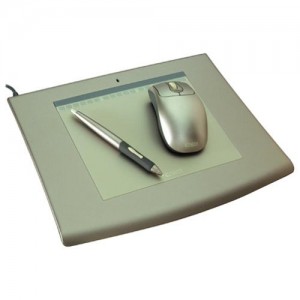
So I’m still rockin this old Wacom Intuos 2 6×8 Platinum, it’s still a nice tablet but I’m considering the upgrade. The thing I don’t like is that there are no interchangable nibs which give you different feels. It’s very plasticy feeling. I like the Intuos 3 with the graphite tips. Maybe I should take sand paper to the nib or something? Do you guys mod your pens at all?

ANCIENT INTUOS 2 - Ebay it?

41N60WPMC6L._SS500_
INTUOS 4 – Worth the loot?

wacom_intuos4_lg

Anyway, who’s using this shiny new Intuos 4? How do you like it? It seems like they keep getting more expensive, is it worth it? What size would you get to go with a 24″ Imac?


5
May 10

Making the plunge

I’m talking about going from a full time corporate job to going full time freelance.

I want to hear your stories. How did you do it and what were the circumstances?
Were all your ducks lined up perfectly or did you just get to a point where there was so much freelance work coming in that you just went for it? Or did you just say the hell with it and jump in the deep end to see what would happen?  Did you like the job you were in previously, hate it or were you just tired of working for someone else?

If you’ve been doing it for a while how is it going for you? Do you ever miss the corporate 9-5?

Are you making more money now? Are you working less or more?

What do you like and dislike about freelancing full time?

What do you do if you like your full time job but are getting so much work freelancing that you have to turn it down?

Spread some inspiration on those of us working the 9-5. Seriously, we’ve got some of the most talented illustrators on the planet on this site, share some wisdom people.

Thanks!


5
Mar 10

Ask a Freelancer

Hey I’ve got a question for you freelancers.

I’ve got it in my head that freelancing is this wondrous thing where I get to work my own hours, and more importantly, live where I want to. I dream of living in a shack in the woods on a lake, or on an island somewhere, or just traveling around like some kind of gypsy nomad. Can you do that kind of thing (obviously dependent on internet availability) or do you need to stay closer to your big clients? Does all of your interaction with your clients happen through email/video conference/phone calls or do you meet face to face?

If you can live where ever you want to why did you choose to live where you do now?


8
Feb 10

Outsourcing

outsourcing

Outsourcing is a pretty hot topic, especially for those of us working in-house in a corporate environment. Obviously most illustrators aren’t too excited about the idea of losing their job to someone overseas charging 3 bucks an hour. Upper management loves it; they save on wages, benefits, computers, office space, etc. At the same time they will only pass those benefits on to the customer if they really have to.

I used to be pretty dead set against the idea of sending work overseas. I had it in my head that they were just lowly factory worker types out to get our jobs. I always thought a better compromise  would be to start up satellite offices in rural America, where land is cheap and unemployment is higher. Americans having a hard time finding work would be happy to work for even $10 per hour, but the jobs would stay in the country.

My attitude changed a bit with a trip I made to China last year to train a group of 10 illustrators there, which I commented about in this post. Who I found there weren’t sneaky job stealers out for American jobs – they were young, hungry illustrators who were lucky to get an education in illustration and not have to work in factories. They wanted desperately to learn and get good at their jobs, something I’ve rarely seen with the people I’ve worked with in the US.

Advantages of outsourcing

  • They work while you are sleeping
  • Low cost
  • Quick turn around times

Disadvantages of outsourcing

  • Communication can be difficult at times.
  • Training, either by traveling to their location or late night conference calls.
  • Getting the quality of work you expect.

How to be competitive with low cost countries

Develop a diverse set of skills. Be able to execute any project your client or employer needs, be prepared to learn how, or involve yourself in it in a meaningful way. Pay attention to what is going on in your industry. Be more than just hands, be their go-to person.

Pay attention to the warning signs. If your company starts up an office in China, chances are someone is going to lose a job. Start working on a Plan B or an exit strategy.

Stay ahead of the game, our field is constantly evolving, and we need to change and adapt along with it.

As a freelancer would you consider or do you already outsource some of your work during peak work loads? Tim Ferriss, author of The 4-Hour Work Week advocates the use of outsourcing as a way to automate your life by working less and making more. If I picked up a huge contract I can’t say I wouldn’t consider it. Though I haven’t tried them, I know there are many sites out there to get you in touch with illustrators all over the world.

Honestly, I’m still on the fence about the whole thing. Of course I would like to keep jobs in the United States but the world is a different place, there are skilled, talented people all over who need jobs. Most of the stuff we own is made in china anyway. I think if it came down to it and I needed help with my work, I would try to go local first, if that didn’t pan out I would considering having the work done overseas.

What do you think?